Core Web Vitals for Business Websites
A business website is more than an online brochure. It is often the first place potential customers learn about a company, evaluate its services, read information, submit an inquiry, or make a purchase. Because of this, website performance has become an important part of the overall user experience and technical SEO strategy.
One of the most important performance frameworks for modern websites is Core Web Vitals.
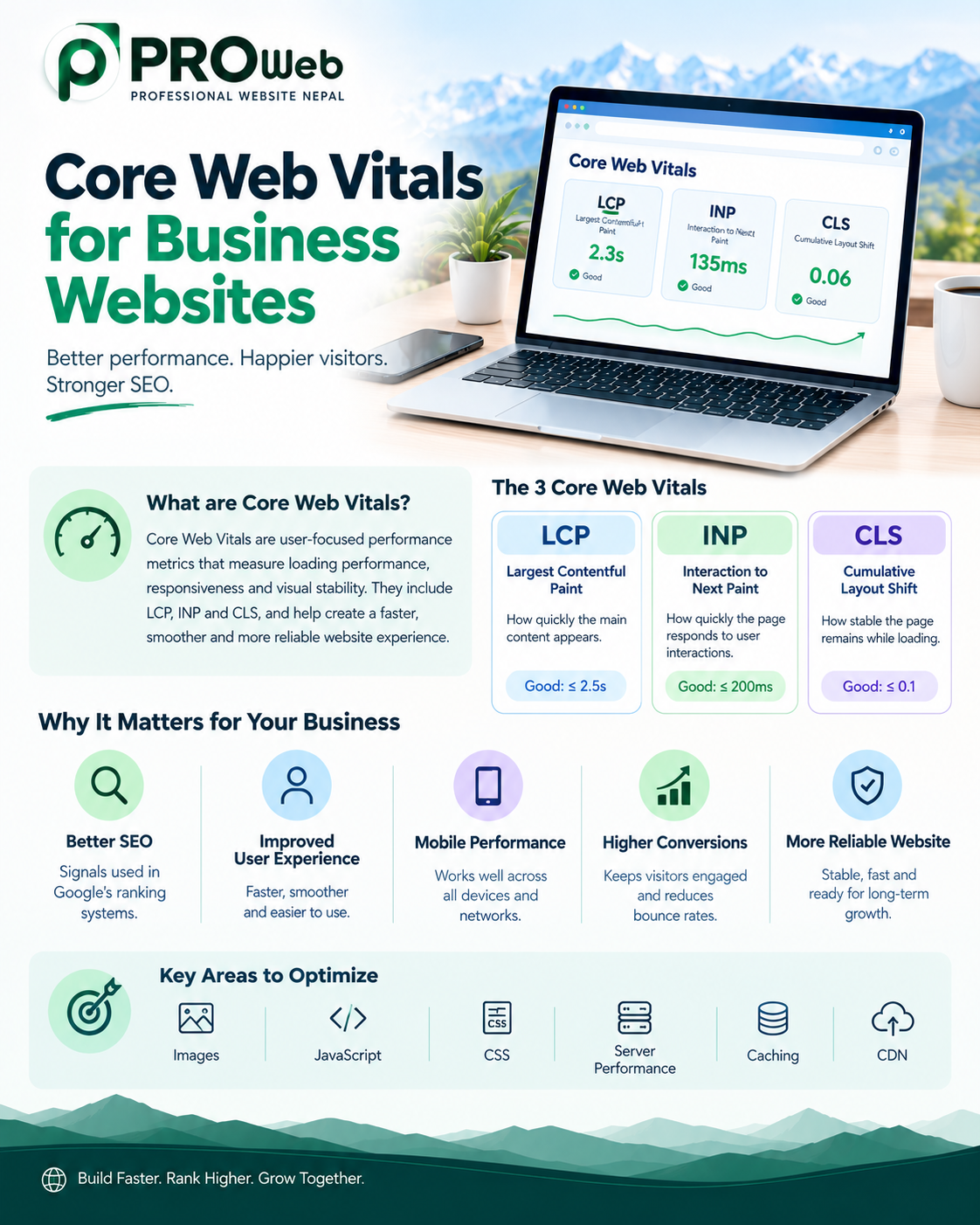
Core Web Vitals are a set of user-focused performance metrics that measure three important aspects of a webpage experience: loading performance, responsiveness, and visual stability. The current Core Web Vitals are Largest Contentful Paint (LCP), Interaction to Next Paint (INP), and Cumulative Layout Shift (CLS). Google uses Core Web Vitals as part of its ranking systems, while also emphasizing that good Core Web Vitals scores alone do not guarantee high search rankings.
For businesses, understanding these metrics can help create websites that are faster, easier to use, more stable, and better prepared for search.
What Are Core Web Vitals?
Core Web Vitals are standardized performance measurements designed to evaluate important aspects of real-world website experience.
They focus on three major questions:
How quickly does the main content appear?
How quickly does the website respond when users interact with it?
Does the page remain visually stable while loading?
The three current metrics are:
Core Web Vital | What It Measures | Recommended Good Threshold |
|---|---|---|
LCP | Loading performance | 2.5 seconds or less |
INP | Interaction responsiveness | 200 milliseconds or less |
CLS | Visual stability | 0.1 or less |
These thresholds are generally evaluated at the 75th percentile of page visits, with mobile and desktop data considered separately.
For a business website, these measurements provide useful insight into whether visitors are experiencing a fast, responsive, and stable website.
1. Largest Contentful Paint (LCP)
Largest Contentful Paint, commonly called LCP, measures how quickly the largest visible content element loads.
The largest element could be a large image, a heading, a video, or another prominent content element within the user's viewport.
LCP is primarily concerned with the loading experience users actually see rather than simply measuring when the browser technically finishes loading the page.
Google's recommended good LCP threshold is 2.5 seconds or less for at least 75% of page visits. A value above 4 seconds is considered poor.
Why LCP Matters for Business Websites
Imagine a visitor searches for a service and lands on your homepage.
If the main headline, hero image, or primary content takes several seconds to appear, the visitor may perceive the website as slow before they even begin interacting with it.
A slow LCP can be caused by factors such as:
Large images
Slow server response
Poor hosting
Render-blocking resources
Unoptimized fonts
Excessive JavaScript
Slow redirects
Poor caching
Large CSS files
Third-party scripts
For a business website, improving LCP can make the initial experience feel considerably faster.
2. Interaction to Next Paint (INP)
Interaction to Next Paint, or INP, measures how responsive a page is when users interact with it.
Instead of focusing only on the first interaction, INP evaluates interactions throughout the user's visit and looks at how quickly the page provides visual feedback after an interaction.
For example, users may:
Click navigation menus
Open dropdowns
Submit forms
Add products to carts
Use search
Open filters
Interact with sliders
Click buttons
Use account features
A website can appear visually loaded while still feeling slow when users interact with it.
A good INP is 200 milliseconds or less. Values above 500 milliseconds are considered poor.
What Can Cause Poor INP?
Poor responsiveness is often associated with excessive JavaScript or long tasks that keep the browser busy.
Common causes include:
Heavy JavaScript
Large third-party scripts
Complex animations
Unoptimized event handlers
Excessive DOM complexity
Large frontend frameworks or components
Too much code executing during interactions
For business websites, this can affect everything from navigation to contact forms and ecommerce interactions.
3. Cumulative Layout Shift (CLS)
Cumulative Layout Shift, or CLS, measures visual stability.
Have you ever tried to click a button and suddenly the page moves because an image or advertisement loads?
That is a layout shift.
CLS measures unexpected movement of visible page content.
Google recommends a CLS score of 0.1 or less for good performance.
Common Causes of Layout Shifts
Layout instability can happen when:
Images do not have reserved dimensions
Videos change the layout after loading
Fonts cause text to move
Advertisements load dynamically
Embedded content changes size
Content is inserted above existing content
Components are rendered without reserving space
For business websites, unexpected movement can be particularly problematic around:
Contact buttons
Navigation menus
Product buttons
Forms
Pricing information
Calls to action
Checkout interfaces
A stable page gives visitors greater confidence when navigating and interacting with the website.
Core Web Vitals and SEO
Core Web Vitals are relevant to SEO because Google includes them among the signals used by its ranking systems.
However, Core Web Vitals should not be treated as a shortcut to higher rankings.
Google explicitly states that achieving good Core Web Vitals scores does not guarantee that a page will rank at the top of Search. Relevance and other aspects of page experience remain important.
This means businesses should approach Core Web Vitals as part of a broader SEO and website-quality strategy.
A strong website should combine:
Helpful content
Search-friendly architecture
Good technical SEO
Mobile usability
Strong performance
Secure HTTPS
Clear navigation
Good accessibility
Internal linking
Proper indexing
Strong Core Web Vitals
Performance supports the overall experience rather than replacing the rest of an SEO strategy.
Core Web Vitals and Mobile Users
Mobile performance deserves particular attention for business websites.
Many visitors access websites through smartphones, often using mobile networks and devices with less processing power than desktop computers.
A website that performs well on a high-end desktop may behave differently on a mobile device.
Businesses should therefore test performance across:
Mobile phones
Desktop computers
Different screen sizes
Different network conditions
Different browsers
Lower-powered devices
Mobile optimization should not simply mean making a desktop website visually smaller. The website should be designed to work efficiently within mobile constraints.
How Images Affect Core Web Vitals
Images are often one of the largest resources on a business website.
Large hero banners, product images, portfolios, team photos, and background images can significantly increase page weight.
Image optimization can involve:
Choosing appropriate image dimensions
Compressing images
Using modern image formats
Serving responsive image sizes
Avoiding unnecessarily large background images
Lazy-loading appropriate below-the-fold images
Preloading critical images when appropriate
Reserving space for images
Image optimization is especially important for LCP when the largest visible element is an image.
How JavaScript Affects Core Web Vitals
JavaScript can add powerful functionality to a website, but excessive JavaScript can also create performance problems.
Heavy scripts can delay:
Page rendering
User interactions
Navigation
Form interactions
Menu responses
Dynamic content
This is particularly relevant to INP because long-running JavaScript tasks can prevent the browser from responding quickly to users.
Businesses should therefore avoid adding scripts simply because they are available.
Every third-party tool should have a clear purpose.
Examples include:
Analytics
Chat systems
Marketing tools
Advertising scripts
Social media widgets
Tracking systems
Customer-support tools
The goal is not to eliminate JavaScript, but to use it efficiently.
How CSS Affects Performance
CSS controls the visual appearance of a website, but large or inefficient stylesheets can contribute to page performance issues.
Businesses can improve CSS efficiency by:
Removing unused styles
Reducing unnecessary CSS
Organizing styles efficiently
Avoiding excessive visual effects
Loading critical styles appropriately
Reducing unnecessary dependencies
A visually attractive website does not need to be overloaded with effects.
Good design and good performance can work together.
Server Performance and LCP
Website performance does not begin in the browser.
The server also plays an important role.
A slow server can delay the initial response before the browser even starts rendering important content.
Factors can include:
Hosting quality
Server location
Server configuration
Database performance
Backend processing
Caching
Traffic levels
Content delivery networks
Application architecture
LCP can include delays associated with connection setup, redirects, and Time to First Byte, meaning server-side performance can influence the final user experience.
For businesses, investing in appropriate hosting and infrastructure can therefore be part of performance optimization.
Caching and Core Web Vitals
Caching allows frequently requested resources or generated content to be reused instead of being processed repeatedly.
Effective caching can reduce unnecessary work and improve response times.
Depending on the website architecture, caching may be applied to:
Static assets
Images
CSS
JavaScript
Database queries
Server responses
Frequently accessed pages
Caching strategies should be configured according to the technology powering the website.
Content Delivery Networks
A Content Delivery Network, or CDN, distributes website resources through servers located in different geographic regions.
This can help deliver static resources from locations closer to users.
CDNs can be particularly useful for businesses serving visitors across multiple locations.
A CDN can help with:
Images
CSS
JavaScript
Fonts
Static files
Other cacheable resources
However, a CDN is not a replacement for optimizing the website itself.
Poorly optimized code, oversized images, and inefficient application logic can still create performance problems.
Core Web Vitals for Ecommerce Websites
Core Web Vitals are particularly important for ecommerce websites because visitors need to interact with many parts of the site.
An ecommerce website may contain:
Product images
Search
Filters
Shopping carts
Product variations
Login systems
Checkout forms
Payment interfaces
Promotional banners
Recommendation systems
A slow or unstable interface can make these interactions frustrating.
Ecommerce businesses should pay particular attention to:
Product-page LCP
Cart responsiveness
Filter interactions
Search responsiveness
Layout stability
Checkout performance
Mobile performance
Performance should be considered throughout the customer journey, not only on the homepage.
Core Web Vitals for Service Businesses
Service-based businesses also benefit from strong performance.
Consider a website for:
Law firms
Hotels
Consulting companies
Construction companies
Educational institutions
Healthcare organizations
Financial companies
Restaurants
Travel companies
Technology companies
NGOs
Professional services
The primary goal may be generating:
Phone calls
Contact-form submissions
Consultation requests
Bookings
Inquiries
Leads
If important pages are slow or difficult to use, visitors may leave before completing an action.
Performance is therefore closely connected to the usability of important conversion pages.
How to Improve Core Web Vitals
Improving Core Web Vitals should begin with measurement rather than guesswork.
A practical optimization process is:
1. Measure the Current Website
Start by determining which metrics are performing poorly.
Look at:
LCP
INP
CLS
Mobile performance
Desktop performance
Server response
Page resources
2. Identify the Largest Problems
Do not optimize everything simultaneously.
Identify the resources or components contributing most to the problem.
3. Optimize Images
Review image sizes, formats, dimensions, and loading behavior.
4. Reduce Unnecessary JavaScript
Remove scripts and functionality that do not provide enough value.
5. Improve Server Response
Review hosting, backend processing, database queries, caching, and infrastructure.
6. Prevent Layout Shifts
Reserve appropriate space for images, videos, fonts, embeds, and dynamically loaded content.
7. Test Again
After making changes, measure the website again.
Performance optimization should be an iterative process.
Tools for Measuring Core Web Vitals
Businesses and developers can use several tools to evaluate website performance.
Useful tools include:
Google Search Console
Search Console provides a Core Web Vitals report that can help site owners identify pages requiring attention.
PageSpeed Insights
PageSpeed Insights provides performance information and optimization opportunities.
Lighthouse
Lighthouse can provide lab-based performance analysis and recommendations.
Chrome DevTools
Chrome DevTools provides developers with tools for investigating performance directly in the browser.
Chrome User Experience Report
CrUX provides real-user experience data for eligible websites.
Different tools provide different types of information. Lab testing and real-user data should not automatically be treated as interchangeable.
For example, INP depends on actual user interactions, so it cannot be measured in the same way as a simple page-load lab test.
Lab Data vs Real User Data
One important concept in Core Web Vitals optimization is the difference between laboratory testing and field data.
Lab data is collected under controlled testing conditions.
Field data comes from real users and reflects actual browsing experiences.
Real users may have:
Different devices
Different internet connections
Different geographic locations
Different browsers
Different hardware capabilities
This means a website can perform well in one testing environment while real users experience different results.
Businesses should therefore avoid relying on a single performance test.
Should Every Website Aim for a Perfect Score?
A perfect performance score should not become the primary objective.
Google specifically notes that good Core Web Vitals scores do not guarantee top search rankings and that optimizing only for a perfect score may not always be the best use of resources.
The more useful goal is to create a website that:
Loads efficiently
Responds quickly
Remains visually stable
Works well on mobile
Provides useful content
Supports business objectives
Is technically accessible to search engines
Performance improvements should provide real value to users rather than simply chasing a number.
Core Web Vitals and Website Design
Performance should be considered during the design stage rather than after the website is finished.
Design decisions can influence:
Image sizes
Animation requirements
Font usage
Page complexity
Component structure
Mobile layouts
Interactive elements
Third-party dependencies
A design that looks impressive in a prototype may become unnecessarily heavy when implemented.
Good website development balances visual design with technical performance.
Core Web Vitals and Website Development
Core Web Vitals should be considered during the entire development process.
A performance-focused development workflow can include:
Planning → Design → Development → Testing → Optimization → Monitoring
This makes performance part of the development process instead of treating it as an emergency fix after launch.
Developers can also establish performance expectations before development begins.
For example, the project can define:
Maximum image sizes
Performance targets
Mobile requirements
JavaScript requirements
Third-party script policies
Caching strategy
Hosting requirements
This approach can prevent many performance problems before they reach production.
Core Web Vitals for Websites in Nepal
Businesses in Nepal should pay particular attention to performance because website visitors may access websites through a wide range of devices and network conditions.
A website should not be optimized only for a fast office connection or a high-end computer.
Testing should consider:
Mobile devices
Different connection speeds
Different browsers
Different screen sizes
Visitors from different geographic locations
A lightweight website can provide a more consistent experience across a wider range of users.
This is particularly important for businesses targeting customers throughout Nepal rather than only users with high-speed connections in major urban areas.
WordPress and Core Web Vitals
WordPress can achieve strong Core Web Vitals when it is properly configured and optimized.
However, performance can be influenced by:
Themes
Plugins
Page builders
Images
Hosting
Database size
Third-party scripts
Unused functionality
A website with many unnecessary plugins and heavy visual components may require more optimization work.
The important factor is not simply whether a website uses WordPress, but how the website is designed, developed, configured, hosted, and maintained.
Custom Websites and Core Web Vitals
Custom development can provide greater control over the website's architecture and functionality.
Developers can build only the components the project requires instead of starting with a large collection of features that may never be used.
This can make it easier to control:
HTML structure
CSS
JavaScript
Database queries
Backend processing
Asset loading
Image handling
Third-party integrations
Caching
However, custom development does not automatically guarantee good Core Web Vitals.
Poorly written custom code can also produce slow websites.
Performance depends on implementation quality.
A Practical Core Web Vitals Checklist
Before launching a business website, review the following:
LCP
Main content loads quickly
Hero images are optimized
Server response is efficient
Critical resources are prioritized
Large unnecessary resources are removed
INP
Buttons respond quickly
Navigation is responsive
JavaScript is optimized
Long tasks are reduced
Third-party scripts are controlled
CLS
Images have reserved space
Videos have defined dimensions
Fonts are handled properly
Dynamic content does not unexpectedly push content
Ads and embeds have reserved space
Overall Performance
Mobile performance is tested
Desktop performance is tested
Images are optimized
CSS is optimized
JavaScript is controlled
Caching is configured
Hosting is appropriate
HTTPS is enabled
Performance is monitored after launch
Common Core Web Vitals Mistakes
Businesses often make performance mistakes during website development.
Using Extremely Large Images
High-resolution images may look good but can create unnecessary page weight.
Installing Too Many Plugins
Additional plugins can introduce scripts, styles, database queries, and other overhead.
Adding Too Many Animations
Animations should enhance the experience rather than make the website unnecessarily complex.
Loading Every Resource Immediately
Not every resource needs to load at the same time.
Ignoring Mobile Performance
Desktop performance does not automatically represent mobile performance.
Adding Too Many Third-Party Tools
Analytics, chat, tracking, advertising, and marketing tools can collectively increase page complexity.
Optimizing Only After Launch
Performance should be considered during planning and development rather than treated as an afterthought.
Chasing a Perfect Score
Performance scores are useful indicators, but they are not the entire definition of a successful website.
Core Web Vitals Are Part of a Bigger SEO Strategy
Core Web Vitals should be viewed as one part of technical SEO and overall website quality.
A business website still needs:
Search-friendly architecture
Useful content
Clear page titles
Descriptive URLs
Internal linking
Proper indexing
Mobile usability
HTTPS
Structured data where appropriate
Accessible content
Strong website security
Local SEO where relevant
Google's documentation emphasizes that page experience includes multiple considerations rather than a single ranking signal.
This means improving Core Web Vitals should happen alongside broader SEO work.
How Professional Website Development Can Help
A performance-focused website should be planned around both business requirements and technical requirements.
At Professional Website Nepal, the development approach can focus on creating websites with:
Clean development practices
Efficient page structures
Responsive layouts
Optimized assets
SEO-friendly architecture
Mobile-first considerations
Performance optimization
Scalable functionality
Secure implementation
Ongoing technical support
The objective is not simply to make a website look attractive.
The website should also provide a reliable experience for visitors and give search engines a technically strong foundation for understanding the site.
Final Thoughts
Core Web Vitals provide businesses with a practical way to evaluate important aspects of website experience.
LCP focuses on loading performance.
INP focuses on responsiveness.
CLS focuses on visual stability.
Together, these metrics help businesses understand whether their websites are delivering a fast, responsive, and stable experience.
However, Core Web Vitals are only one part of a successful website and SEO strategy. Google states that good Core Web Vitals do not guarantee top search rankings, so businesses should combine performance optimization with relevant content, strong technical SEO, mobile usability, security, and an overall good page experience.
For businesses investing in a new website or improving an existing one, performance should be considered from the beginning—not added as an afterthought.
A well-developed website should be designed not only to look good, but also to load efficiently, respond quickly, remain stable, and provide a strong experience for real users.
Frequently Asked Questions
What are Core Web Vitals?
Core Web Vitals are Google's current user-focused web performance metrics covering loading, responsiveness, and visual stability. The current metrics are LCP, INP, and CLS.
What is a good LCP score?
A good LCP is 2.5 seconds or less at the 75th percentile of page visits.
What is a good INP score?
A good INP is 200 milliseconds or less at the 75th percentile.
What is a good CLS score?
A good CLS is 0.1 or less at the 75th percentile.
Do Core Web Vitals directly determine Google rankings?
Core Web Vitals are used by Google's ranking systems, but Google states that good scores alone do not guarantee high rankings.
Are Core Web Vitals important for mobile websites?
Yes. Businesses should evaluate performance across mobile and desktop users because device capabilities and network conditions can vary considerably.
Can WordPress achieve good Core Web Vitals?
Yes. WordPress websites can achieve good performance when themes, plugins, images, hosting, scripts, and other components are properly optimized.
Can custom websites have good Core Web Vitals?
Yes. Custom development can provide significant control over the site's architecture and resources, but the quality of implementation ultimately determines performance.
How often should Core Web Vitals be monitored?
Performance should be monitored continuously rather than checked only once. Websites change over time as new content, scripts, images, plugins, and functionality are added.
What is the main goal of Core Web Vitals optimization?
The goal should be to provide visitors with a fast, responsive, and visually stable experience while supporting the website's broader business and SEO objectives.